

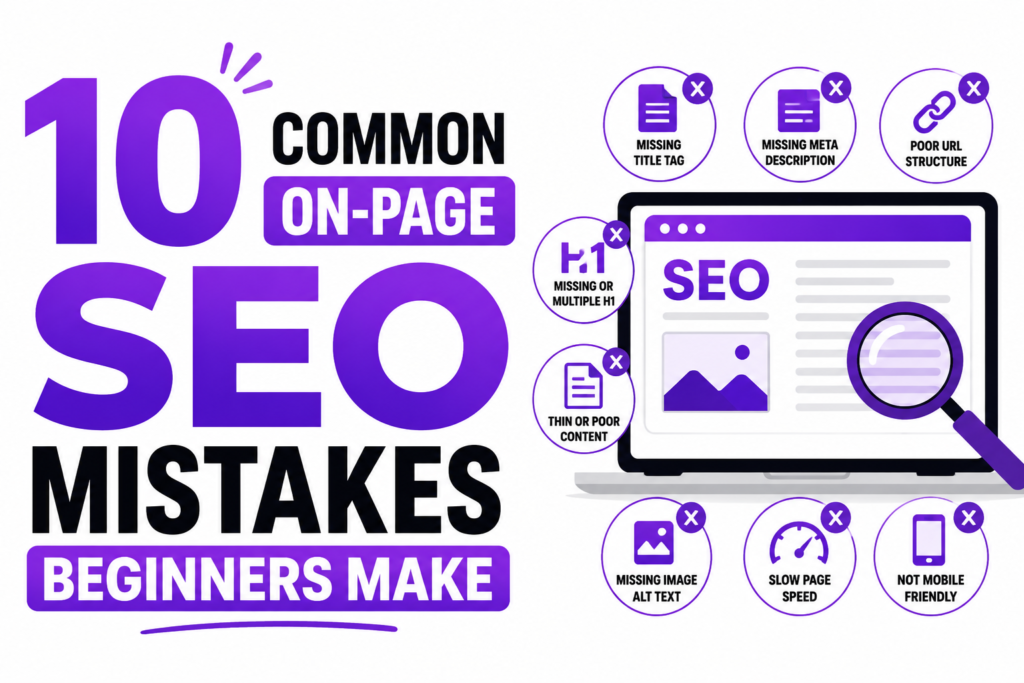
If you’ve published content and watched it sit on page 5 of Google with zero traffic, the problem usually isn’t your writing — it’s your on-page SEO. On-page SEO mistakes beginners make are rarely dramatic. They’re small, invisible-to-the-naked-eye errors: a duplicate title tag here, a missing alt attribute there. But search engines notice every one of them, and so do the common on-page SEO errors that quietly cap your rankings before your content even gets a chance to compete.
Below are the 10 most frequent on-page SEO mistakes we see beginners make, broken down using a simple Problem → Impact → Fix structure so you can audit your own site in the next 30 minutes.
1. Ignoring Search Intent (Optimizing for the Wrong Terms)
The Problem:
Many beginners target broad, high-volume keywords without checking what searchers actually want to see. They’ll build a commercial “Buy Now” product page and try to rank it for an informational query like “what is on-page SEO,” or vice versa.
The Impact:
This is a classic user search intent mismatch. Google’s algorithm is exceptionally good at matching content type to query type. If your page format doesn’t match what’s already ranking, you’ll struggle to break into page one no matter how well-written your content is.
The Fix:
Before you write a single word, Google your target keyword and study the top 10 results. Ask yourself: are they blog posts, product pages, tools, or videos? Are they short comparisons or long in-depth guides? Match that format. If the top results are all “best of” listicles, don’t publish a single-product landing page for that term — you’re fighting the algorithm instead of working with it.
2. Keyword Stuffing & Over-Optimization
The Problem:
In an effort to “help Google understand the page,” beginners cram their primary keyword into every heading, every paragraph, and sometimes every sentence until the content reads like it was written by a robot.
The Impact:
Keyword stuffing is one of the oldest on-page SEO mistakes in the book, and modern algorithms are trained specifically to detect and penalize it. Beyond the ranking risk, it destroys readability — and a page that sounds unnatural won’t earn links, shares, or repeat visitors.
The Fix:
Write for humans first. Aim for a keyword density of roughly 0.5%–1.5%, and lean on LSI (Latent Semantic Indexing) keywords — natural synonyms and related terms — to demonstrate topical depth rather than repetition. Instead of writing “on page SEO mistakes” five times, mix in phrases like “common on-page errors,” “ranking issues,” or “technical SEO oversights.”
3. Missing or Duplicate Title Tags & Meta Descriptions
The Problem:
Beginners often leave title tags on their CMS default (literally “Home” or “Page 1”), or copy-paste the same title across multiple blog posts because it’s faster.
The Impact:
Duplicate title tags confuse search engines about which page to rank for a given query, and they can cause both pages to underperform. A missing or generic title also kills your click-through rate in the search results, even if you do manage to rank.
The Fix:
Every single URL on your site needs a unique, compelling title tag between 50–60 characters, with your primary keyword placed as close to the beginning as possible. Pair it with a meta description that expands on the promise of the title and includes a soft call to action — this is your ad copy in the SERP, treat it like one.
4. Poor Header Tag Hierarchy (H1 to H4)
The Problem:
This is one of the most common on page SEO errors we audit: sites with multiple H1 tags on a single page, or headers used purely for visual styling (making text bigger or bold) rather than structural meaning.
The Impact:
Poor header structure makes it harder for search engines — and for AI Overviews and featured snippets — to understand your content’s hierarchy. It also hurts accessibility for screen-reader users, which can indirectly affect your rankings through user experience signals.
The Fix:
Use exactly one H1 per page — this is your main title and should contain your primary keyword. Below that, structure your subtopics sequentially: H2s for major sections, H3s nested inside them for supporting points, and H4s only if you need a further breakdown. Never skip a level (e.g., H2 straight to H4) and never use headers just to change font size — that’s what CSS is for.
5. Neglecting Internal Links & Anchor Text
The Problem:
New pages get published and then… nothing links to them. They become orphan pages with zero internal links pointing in. Alternatively, when links do exist, the anchor text is vague — “click here,” “read more,” “this article.”
The Impact:
Internal linking mistakes like these prevent link authority (often called “link juice”) from flowing to your newer or more important pages. Vague anchor text also wastes a huge opportunity to tell Google exactly what the destination page is about.
The Fix:
Whenever you publish new content, go back through 3–5 related older articles and add contextual links pointing to it. Use descriptive, keyword-rich anchor text — instead of “click here,” write “check out our complete on-page SEO checklist.” This single habit is one of the fastest ways to boost a new page’s visibility.
6. Blank or Non-Descriptive Image Alt Text
The Problem:
Images get uploaded straight from a camera or stock site with alt text left blank, or worse, left as the default file name — think “IMG_0042.jpg” or “screenshot-final-v2.png.”
The Impact:
Missing alt text is a double loss: it hurts accessibility for visually impaired users relying on screen readers, and it forfeits a legitimate, low-effort ranking opportunity in Google Image Search.
The Fix:
image should have alt text that describes what’s actually in the image in 5–10 words, naturally weaving in a relevant keyword only where it genuinely fits. “Bar chart comparing on-page SEO error frequency by category” is useful; “on page SEO mistakes on page SEO mistakes image” is stuffing, and search engines can tell the difference.
7. Creating Thin Content That Lacks E-E-A-T
The Problem:
Perhaps the most damaging of all common on-page SEO errors: publishing short, generic 300-word posts that restate what’s already on page one without adding a single original thought, statistic, or example.
The Impact:
Thin content directly undermines E-E-A-T (Experience, Expertise, Authoritativeness, Trustworthiness) — the framework Google’s quality raters use to judge whether content deserves to rank. Thin pages rarely earn backlinks, rarely satisfy search intent fully, and are increasingly filtered out by helpful-content-style algorithm updates.
The Fix:
Prioritize depth over word count. A page doesn’t need to be 3,000 words to be excellent, but it does need original insight: your own screenshots, a step-by-step checklist built from real experience, an opinion backed by data, or a unique framework the reader can’t get from three other articles. If you can’t add something no other page has, ask why yours should outrank them.
8. Duplicate or Thin Meta Descriptions Across Pages
The Problem:
Closely related to mistake #3, many site owners either skip meta descriptions entirely on secondary pages or reuse the same boilerplate description sitewide.
The Impact:
While meta descriptions aren’t a direct ranking factor, a generic or duplicated one drags down your click-through rate — and CTR is a strong indirect signal that search engines use to gauge relevance and quality over time.
The Fix:
Write a unique 150–160 character meta description for every important page, summarizing the specific value that page delivers rather than a general company blurb.
9. Ignoring Page Speed & Core Web Vitals
The Problem:
Beginners pour all their effort into keywords and copy while ignoring how the page actually performs — large uncompressed images, unused JavaScript, and slow server response times.
The Impact:
Core Web Vitals (loading speed, interactivity, and visual stability) are confirmed ranking factors, and a slow page also increases bounce rate, which further signals poor user experience to search engines.
The Fix:
Run your URL through Google’s PageSpeed Insights, compress images before upload, and lazy-load anything below the fold. Small technical wins here often move rankings faster than another round of content edits.
10. Not Optimizing for Mobile Usability
The Problem:
Content is written and formatted while looking only at a desktop screen — dense paragraphs, tiny tap targets, tables that overflow the viewport.
The Impact:
With Google using mobile-first indexing, the mobile version of your page is the version being evaluated for ranking. A desktop-only mindset means you’re optimizing for the wrong device entirely.
The Fix:
Preview every page on an actual phone before publishing. Break up long paragraphs, make buttons and links easy to tap, and confirm tables and images resize properly on smaller screens.
Quick On-Page SEO Audit Checklist for Beginners
| Element | Common Mistake | Recommended Best Practice |
|---|---|---|
| Title Tag | Missing or over 60 characters | 50–60 chars, includes target keyword near the start |
| Header Tags | Multiple H1 tags | One H1, structured H2/H3 hierarchy |
| Internal Links | “Click here” anchor text | Descriptive context (e.g., “our SEO guide”) |
| Image Alt Text | Blank / image1.png | Clear, descriptive text for accessibility & search |
| Content Depth | Thin, generic 300-word posts | Original insights, checklists, and real examples |
| Meta Description | Duplicated across pages | Unique 150–160 character summary per page |
| Page Speed | Unoptimized images, slow load | Compressed assets, fast server response |
| Mobile Experience | Desktop-only formatting | Fully responsive, easy-to-tap mobile layout |
💡 Pro Tip for New Domains
If you’re building a new site or section, consider offering an interactive or downloadable asset — like a free “On-Page SEO Checklist Sheet” — as a lead magnet to capture emails while you build authority. And when writing about any of the errors above, keep using the Problem → Impact → Fix structure throughout your content. This format isn’t just easier for readers to skim; it’s also exactly the kind of clearly segmented, answer-first structure that Google Featured Snippets and AI Overviews favor when selecting content to cite.
Fixing these 10 on-page SEO mistakes won’t happen overnight, but tackling them one at a time — starting with title tags, headers, and thin content — is often enough to see a measurable ranking shift within a few weeks. Audit one page today using the checklist above, and make it a habit before you hit publish on the next one.